Account roles, access, and permission
Updated: February 10, 2026
Overview
The partner program has several mechanisms to manage administration of the partnership and specific tasks while preserving security.
- Roles. Define all partner users into two global access levels (Admin, user).
- Role designations. Extends administrative privileges for the Partner Sales Center or the Partner Benefits Center to specific users or admins.
- Dedicated contacts. Extends permissions to specific contacts responsible for communications and tasks in distinct functional areas.
Global roles
Adobe recognizes two primary roles for partner contacts: Admin and User. This structure ensures that admins have visibility of organizational-level operations while users focus on individual-level tasks within the partner ecosystem.
NOTE: For partners who have a corporate parent or subsidiary entities, the admin for the parent company is distinguished as a Global Parent Admin, which can not be extended to child entities.
Admins have full access across most connected partner program systems, which allows the admin to manage all aspects of their Adobe partnership. This includes:
- Full access to Manage Profile
- View and edit company information
- Managing contacts and assigning permissions
- Viewing dashboards
- Managing compliance tasks
In addition, admins are responsible for managing program requirements such as:
- Applying for product specialization
- Submitting customer deployments (references)
- Managing the Partner Directory listing
As long as your company’s compliance status is active, admins have full access to the Partner Sales Center. As an admin, you can view lead and opportunity information across your company account and any affiliated partner accounts. By default, users also gain access to the Sales Center but have fewer privileges than admins and can only see their own leads and opportunities.
NOTE: The admin role does not automatically include access to the Partner Benefits Center. Instead, any admin or user can be defined as a Billing admin to manage the membership subscription and other transactions.
For the User role, access to specific settings and actions are restricted by default. User-level access in Manage Profile includes:
- View or edit personal information
- View-only access to other company information
- View or submit support cases
- View achieved credentials
- Set communication preferences
Users can’t perform administrative actions like editing company information or managing roles. To access the Partner Benefits Center for membership subscriptions or other transactions, a user must be defined as a Billing admin.
Role designations
In addition to the foundational roles of Admins and Users, role designations extend admin-level privileges within specific systems and empower designated users to act with administrative authority in defined areas. These designations provide targeted administrative capabilities without granting full program-wide access, offering a more granular and secure approach to role management
Billing admin. Users or admins assigned the Billing admin designation can manage membership subscriptions and other transactions through the Partner Benefits Center. Billing admins can edit payment sources and initiate mid-year uplevel requests.
This role is critical for financial operations and can only be assigned by a Global Parent Admin ensuring centralized control.
Sales Center admin. Users or admins assigned the Sales Center admin designation have full administrative access to the Partner Sales Center and can view and edit all registered leads and opportunities across their entity regardless of which users entered the lead. By default, all users have access to the Sales Center, but only Sales Center admins have visibility of all leads and reports.
Dedicated contacts
Distinct from roles and role designations, dedicated contacts serve as specific points of contact for targeted responsibilities.
Legal & compliance contact. This person is responsible for handling all legal topics related to your partnership including program agreement communications and compliance renewals. In alignment with your company’s admin, this person ensures your company’s legal and regulatory alignment.
Learning & development contact. This person oversees partner enablement topics and credentialing efforts. They receive updates related to learning, certification, and enablement, including communication from the Adobe Enablement Node. These contacts are essential for maintaining operational clarity and accountability within their domains, without overlapping with broader administrative or technical permissions.
Viewing your role and access in Manage Profile
-
Log into the Partner Experience Hub.
-
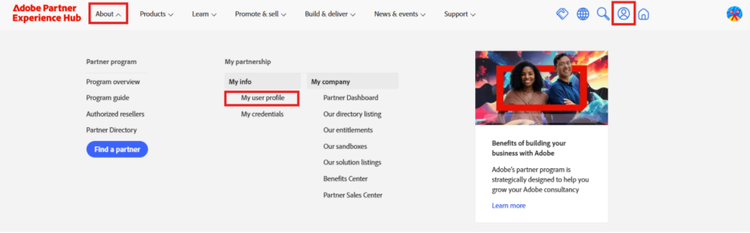
Use the avatar icon or the About menu in the navigation bar to access Manage Profile.
-
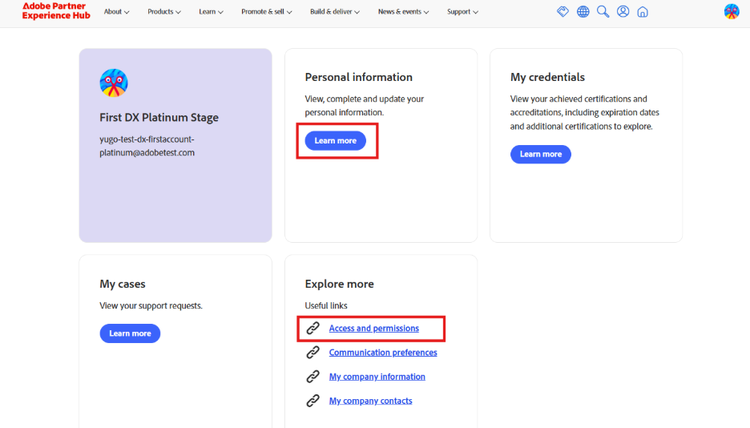
The next page is a collection of links to access different aspects of your profile. Either of the actions below will take you to the appropriate page:
-
Personal information → Learn more
-
Explore more → Access and permissions
-
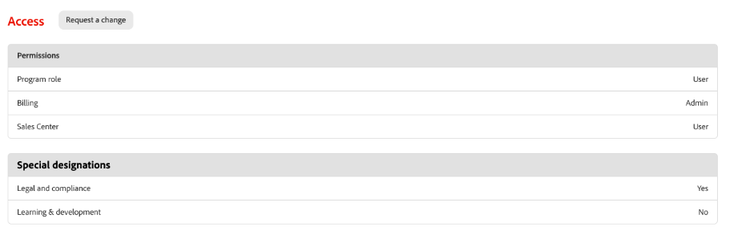
Scroll down to the Access section to review your roles, designations, and if you are a dedicated contact. In this example, the individual is a only a user at the global level, but they have admin privileges for the Partner Benefits Center, and are the dedicated contact for all things related to legal and compliance.
-
-
You may also request a change in your role by clicking on Request a change, which will initiate a request to your organization’s admin for approval. Once approved, you will receive an email confirmation and can review the updated changes in your user profile.