SUPPORT GUIDE
About the Adobe Partner Directory and managing your company’s profile
Updated: August 26, 2026

JUMP TO SECTION
- Overview
- Qualification criteria for Partner Directory profile(s)
- Creating your Directory profile
- Why do I already have a Partner Directory profile?
- Updating your Directory profile
- Viewing your published profile
- Profile status definitions
- Default vs. enhanced Partner Directory profiles
- Subsidiary Partner Directory profiles
- Customer inquiries sourced from your listing
- How Adobe ranks search results in the Partner Directory
- Filtering Directory search results
Overview
One of the partner program’s most valuable benefits, your Adobe Partner Directory profile is the easiest way to get your company in front of current clients, prospects, and Adobe sellers.
The Partner Directory is a public website and among the most popular pages on the Partner Experience Hub. Your company profile amplifies your business and Adobe expertise to our global community. Make sure you’re leveraging this important benefit.
Directory profiles are exclusive to Silver partners and above.
Qualification criteria for Partner Directory profile(s)
Paying partners at the Silver level and above are eligible for a Partner Directory listing.
For eligible partners, Adobe automatically creates a default Partner Directory profile after the partner vetting process is complete and the partner account has been approved. No separate application is required for the initial default listing.
Adobe creates the default profile using information collected during onboarding, including company details, website information, locations, and other profile information available within the Partner Experience Hub. Once created, the listing goes through Adobe's standard review and approval process before it is published to the Partner Directory.
Profile limits depend on your partner level and account structure:
- Silver and Gold: One Partner Directory listing is supported. For companies with a parent/subsidiary account structure, the profile is associated with the Global Parent Account. Silver and Gold subsidiaries cannot create separate listings.
- Platinum: The Global Parent Account has its Partner Directory profile, and eligible Platinum subsidiaries may submit their own additional Partner Directory profiles. Subsidiary listings are not created automatically and must be submitted separately.
Creating your Directory profile
Partner Directory listings are created by the partner and can only be created or edited by your company’s admin.
- Sign in to the Partner Experience Hub
- Navigate to About → My partnership → Our directory listing
- Click Create a listing
- Complete all mandatory fields
- Follow the listing form directions and complete all mandatory fields and submit
- Click Save to save your completed fields (you can return and edit at any time)
- Once you’ve completed all steps, you can click Preview listing in the left margin to preview your listing in a new browser tab
- (Optional) To make additional changes, return to the original tab and use Previous Step and Next Step buttons to navigate to the field you want to change
- On the last page, click Submit to send your listing profile to Adobe for review
When you return to the original page, the status of your application will show Application under Adobe review. At this time, you can preview your profile, but you cannot make any further edits until your listing has been published. You will receive an email once your profile is published.
Why do I already have a Partner Directory profile?
Adobe automatically creates a default Partner Directory listing for eligible Silver, Gold, and Platinum partners using information collected during onboarding and partner approval.
This eliminates the need to submit an initial Partner Directory application and helps ensure eligible Adobe partners can be discovered by customers searching the Partner Directory.
Your default profile goes through Adobe's standard review and approval process before it is published. Once the listing is available, you can review and enhance the information through Manage Profile > Partner Directory.
Updating your Directory profile
Sign in to the Partner Experience Hub
- Navigate to About → My partnership → Our directory listing
- You will see the header “Active listing”
- Click on Edit listing
- Edit the fields you want to update and click Submit
When you return to the original page, the status of your application will show Application under Adobe review. At this time, you can preview your updated profile, but you cannot make any further edits until your updates have been published. You will receive an email upon publication, typically within two business days.
As your partnership matures and your organization acquires credentials, specializations, and validated partner offerings, Adobe will add details to your profile that highlight or quantify your company’s expertise and improve your position in the search results. You can always refine or revise the new information using the steps above.
Viewing your published profile
Once published, your listing will appear in the Partner Directory on one of two tabs based on the primary business type that was selected when your company account was registered. Your primary business type can be viewed under the Company information section of Manage Profile.
- Consulting/Professional Services shows under the Solution tab
- ISV/Data Provider shows under the Technology tab
If your company meets the requirements to have its profile published on both tabs, the listing will be replicated (and removed if requirements are no longer met).
Profile status definitions
- Draft. Your application is in progress and has not been submitted for review. Once all required fields are completed, click Submit on final screen.
- Application under Adobe review. Your proposed profile (original or updated) has been submitted to Adobe and will be reviewed within two business days.
- Published. Your profile is approved and has been published to the Partner Directory. Note that it can take up to an hour for your updates to appear.
- Rejected. Your application has been rejected during review. You should have received an email with an explanation for the rejection. Further questions should be directed to the support team
Default vs. enhanced Partner Directory profiles
A default listing is the initial Partner Directory profile Adobe creates for an eligible partner, using information already provided during onboarding and partner approval.
An enhanced listing is a default listing that the partner organization has updated with additional or revised information. From Manage Profile > Partner Directory, admin users can enhance available profile information, such as:
- Company logo
- Company description
- Adobe applications and solutions
- Specializations and areas of expertise
- Industries served
- Company locations
- Partner services and capabilities
Enhancing your listing gives prospective customers a more complete view of your company's Adobe expertise, capabilities, and services.
Important: your Partner Directory listing is public. Please review your information carefully before submitting changes.
Subsidiary Partner Directory profiles
Only eligible Platinum subsidiaries can submit an additional Partner Directory listing.
For partners with a parent/subsidiary account structure, the default Partner Directory listing is created for the Global Parent Account. Default profiles are not automatically created for subsidiaries.
- Silver and Gold subsidiaries are represented by the Global Parent Account's listing and cannot submit a separate Partner Directory profile.
- Platinum subsidiaries may submit their own Partner Directory profile for review, giving eligible subsidiaries a separate presence in the Partner Directory.
Customer inquiries sourced from your profile
Customers can submit inquiries for your company through the Contact us option on the Directory profile.
To view your inquiries:
- Sign in to the Partner Experience Hub
- From the navigation menu, go to About → My partnership → My company → Our directory listing
- Inquiries are visible underneath the listing status tile
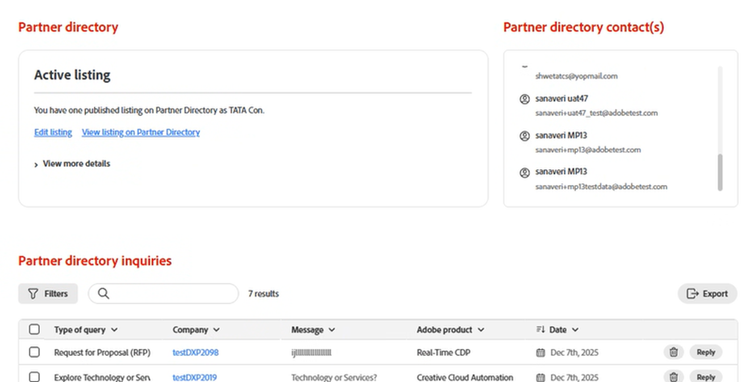
You can export a list of all inquiries, delete inquires, or reply to messages. If you click on Reply, your default email carrier will open with the original message and sender added.
How Adobe ranks search results in the Partner Directory
When a user searches for relevant partner profiles in the Partner Directory, results are prioritized by a combination of the factors below, as these indicate more advanced expertise with Adobe applications. The remaining profiles are then listed alphabetically and adjusted as you select filters.
By default, Partner Directory results prioritize partner profiles based on the following attributes.
- Number of product specializations. Adobe Specialized Partners have demonstrated real-world competence in one or more Adobe applications by achieving both certifications and successful customer references. (Applies to Solution Partner results. Learn about eligibility for product specializations.)
- Total employees with active certifications. Attainment of Adobe product certifications indicates a partner’s commitment to fostering Adobe expertise among its workforce. (Applies to Solution Partner results. Explore certification)
- Number of customer deployments. Denotes the number of successful customer engagements the partner has submitted as a reference over the last two years. (Applies to Solution Partner results. Submitting deployments)
- Active Co-Sellers. Partners can earn the Active Co-Seller designation by consistently demonstrating strong co-selling performance with Adobe within a defined product category and market area. (Applies to both Solution and Technology Partners. Learn more about the Active Co-Seller Designation)
- Partner level. As part of the program design, participants are recognized as either Community, Silver, Gold, or Platinum partners. The levels have increasingly rigorous requirements for attainment as partners progress in the program. (Applies to both Solution and Technology Partners. View program guide)
- Partner solutions. Partners that have developed replicable service packages or technology integrations can apply for Adobe’s stamp of approval through our App Assurance, Accredited Solution, or Rapid Deployment Solution designations, which will then influence sort order rankings. (Applies to Technology Partner results. Solution validation)
- Strategic partner designation. Identifies organizations with a deep level of engagement with Adobe through strategic business alignment, joint go-to-market initiatives, product collaboration, or other long-term partnership investments.
Current ranking order by partner type
Solution partner results are currently ranked in this order:
- Number of specializations
- Total employees with active certifications
- Number of customer deployments
- Active Co-Sellers
- Partner level
Technology partner results are currently ranked in this order:
- Strategic partner designation
- Partner solutions
- App Assurance (prioritized within Partner solutions)
- Active Co-Sellers
- Partner level
Filtering Directory search results
After the default sorting described above, users can refine Directory search results using filters to find partners aligned with their specific needs. Note that when one or more filters are used, the four prioritization factors are still applied first.