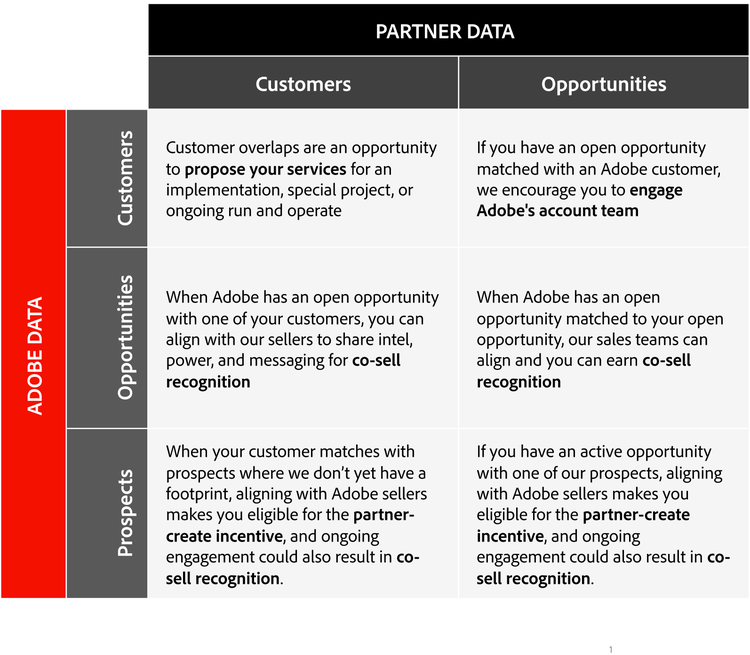
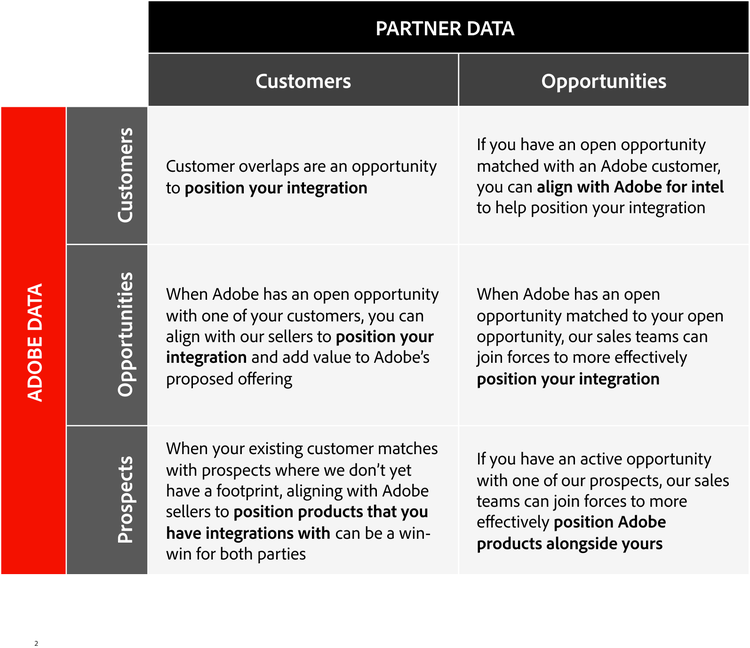
Account mapping is the process of comparing your accounts with Adobe’s to identify shared customers and opportunities. It helps partners align with Adobe teams, focus gotomarket efforts and collaborate more effectively. Adobe uses Crossbeam to manage the mapping process.
Crossbeam powers ecosystem-led growth by helping partners securely identify customers and opportunities shared with Adobe. By making overlap visible and collaboration easy, partners can activate joint go-to-market efforts faster.
Crossbeam offers a free plan to ensure you can access this valuable benefit. If your company doesn’t have a paid Crossbeam account and you’re not able to get a free Crossbeam account due to legal, data security, or other reasons, Adobe can use Crossbeam’s Offline Partner feature to complete account mapping for you. Your sales and field teams will be disconnected from the platform, but the Adobe field will be able to see overlap and your rep contact info if you provide it.
anchor
account
style
two up, xl gap
layout
1 | 2
Connecting with Adobe on Crossbeam
Any Gold or Platinum partner can request to partner with Adobe on Crossbeam and share data. Partners with access to Adobe’s partner success resources can request support with account mapping from their assigned contact
anchor
connect-crossbeam
style
two up, xl gap
layout
1 | 2
The most successful partners share overlap data with Adobe.
Solution partners should share:
Customers—any company that has had an active MSA in the last two years.
Opportunities—related to potential new licenses of Adobe software (including renewals and expansion)
Fields to include—Adobe product(s), Rep name, Rep email, Close date
Technology partners should share:
Customers—Active subscriptions
Opportunities—Open discussions with potential customers
Fields to include—Rep name, Rep email
Adobe will match sharing settings with Gold and Platinum partners. For example, if you share overlap counts for customers, Adobe will reciprocate and share overlap counts back. If you share data for customers, Adobe will share that level of detail as well.
Silver partners are encouraged to share data with Adobe and will receive overlap counts for customers, opportunities and prospects by default. Adobe shares our new logo target list with all partners, including rep names so that partners can connect more quickly. Adobe may elect not to share data with a partner for any reason.
Understanding and requesting populations on Crossbeam
anchor
populations
style
two up, xl gap
layout
1 | 2
Once you partner with Adobe on Crossbeam and share your data, you can request Adobe to share data. Adobe Populations on Crossbeam are segmented by Adobe’s customer experience applications. The following populations are available:
anchor
style
two up, xl gap
layout
1 | 2
Populations on Crossbeam by Adobe applications
Customer Populations
Opportunity Populations
Advertising Cloud Customers
Advertising Cloud Opportunities
Analytics Customers
Analytics Opportunities
Audience Manager Customers
Audience Manager Opportunities
Campaign Customers
Campaign Opportunities
Commerce Customers
Commerce Opportunities
Customer Journey Analytics Customers
Customer Journey Analytics Opportunities
Data Distiller Customers
Data Distiller Opportunities
Enterprise Creative Cloud Customers
Experience Manager Opportunities
Experience Manager Customers
Experience Platform Opportunities
Experience Platform Customers
GenStudio for Performance Marketing Opportunities
GenStudio for Performance Marketing Customers
Journey Optimizer Opportunities
Journey Optimizer Customers
Marketo Opportunities
Marketo Customers
Merchant Services Opportunities
Merchant Services Customers
Mix Modeler Opportunities
Mix Modeler Customers
Real-time CDP Opportunities
Real-time CDP Customers
Target Opportunities
Target Customers
Workfront Opportunities
Workfront Customers
style
two up, xl gap
layout
1 | 2
In addition, the following unsegmented populations are available:
Customers
DX Customers
Opportunities
DX Opportunities (Stage 3-7)
DX Prospects (Stage 1-2)
Greenfield Target Accounts on
anchor
style
two up
layout
1 | 2
Fields included in populations
The standard data fields within populations are:
anchor
fields
style
two up, xl gap
layout
1 | 2
Standard data fields within populations
Account Name
Account Website
Country
Geo
Industry
Market Area
Minor Segment
Parent Name
Region
Segment
State
Updated At
Close Date
CRM ID
Deal Reg ID
Major OPG
OPG1
Name
Sales Stage
style
two up, xl gap
layout
1 | 2
Segment fields indicate how Adobe goes to market with an account, with Industry being larger accounts in general, and Enterprise and Scale being smaller. OPG fields are Adobe product families.
Adobe updates populations weekly so you can set alerts in Crossbeam to let you know about new or updated overlaps.
There are a variety of ways to use Crossbeam data to your advantage. To get started, review some of our suggested actions in the charts below.
anchor
overlaps
style
two up, xl gap
layout
1 | 2
Solution partners
Technology Partners
style
two up, xl gap
layout
1 | 2
Collaborating with Adobe
Adobe reps can see which partners are active in their accounts and are given instructions on how to contact partners. If you share your company’s rep names and email addresses in Crossbeam, the Adobe field will have access to this information. We are not using the Crossbeam for Sales messaging platform today.
As you receive requests from Adobe, we recommend you work with your company’s sellers on how to best position your organization with Adobe sellers. Adobe may ask for support from your company’s rep if you’ve shared that data with us. Adobe calls this a partner assist.
Responding positively to Adobe inquiries helps build a partner’s reputation with Adobe and opens deal registration opportunities. Adobe sellers may contact you for introductions, account intel, or support with accessing key customer decision makers. Adobe reps will be educated on your company’s capabilities through your Adobe Exchange Marketplace and Partner Directory listings, in addition to any information that you may have shared with our team through our internal field enablement portal. We recommend ensuring all of these resources are reviewed regularly and kept up to date.
anchor
collaboration
style
two up, xl gap
layout
1 | 2
Partner assist requests
Each request from the Adobe field is first vetted by Adobe’s partner team and sent to the appropriate contact at each partner org, depending on preferences and partner manager coverage. Enabling organic connections with Adobe reps has potential to scale the impact of our partnership. Partners that provide support to the Adobe field when asked will build equity with Adobe field teams and will naturally gain access to new avenues for advancing their own businesses. Partners eligible for deal registration may also be eligible for incentives.
Account mapping is the process of comparing your accounts with Adobe’s to identify shared customers and opportunities. It helps partners align with Adobe teams, focus gotomarket efforts and collaborate more effectively. Adobe uses Crossbeam to manage the mapping process.
ContentType
Tags
Details
cta1Text
cta1URL
BadgeText
BadgeImage
Authoring Tips
For more information and advanced features see theSend to Caas documentation page.